Industry guides · 3 min read
How to build a Seattle coffee shop list for wholesale bakery accounts
Find coffee shops by delivery territory, separate cafés from roasters, and create a sampling sheet with locations and contact routes.
A wholesale bakery needs storefronts that might buy pastries, not just businesses with “coffee” in the name. A roasting warehouse, a café with its own kitchen, and an espresso kiosk without food are three different conversations. Keep the records; separate the conversations.
Step by step
- 01
Search for the buying location
From Campaigns, enter “Seattle — pastry samples” as Campaign name and “Coffee shops” as Business type / industry. For a roasting-equipment sales list you might start with coffee roasters instead. The right search depends on what goes out of your loading dock.
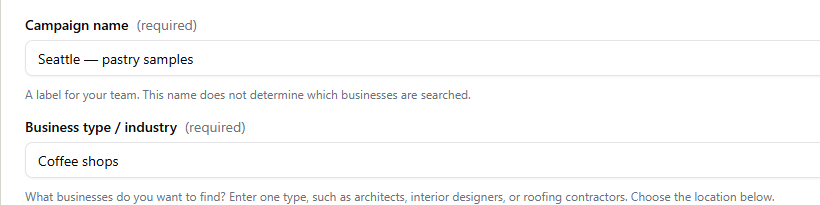
Campaign name labels the list; Business type / industry defines the search · Select the image for full size - 02
Choose a route-sized geography
Under City or area coverage choose United States, Washington, then Seattle. Check the preview and click Queue … searches once. For a route limited to Pioneer Square, use that area when supported or identify the neighborhood by address during review. Don't rely on the campaign name to narrow the search.
- 03
Read the menu like a wholesale baker
On the campaign card click Open campaign leads. Compare the storefront address with its official locations page. Look for a food menu, an existing bakery partner or a statement that items are made in house. Note exactly which you saw. A menu photo is not proof of a current buying relationship, and no online menu doesn't mean the shop sells no food.
On the saved campaign card, click Open campaign leads · Select the image for full size - 04
Distinguish one buyer from several cafés
A local brand may have several drop points but place orders centrally. In your sheet keep the café address and public contact as delivered, then add a parent-brand column. Use Visit Seattle’s coffee guide below to spot possible naming variants and neighborhoods; it’s a resource for visitors, not a complete wholesale account list.
- 05
Export a tasting run you can actually deliver
Check the shops on the current page for the first sample route. Choose Export CSV and the selected-row option. Open the file and add neighborhood, food evidence, sample status and next check. Confirm receiving hours with the business when appropriate; public opening hours need not be vendor receiving hours.
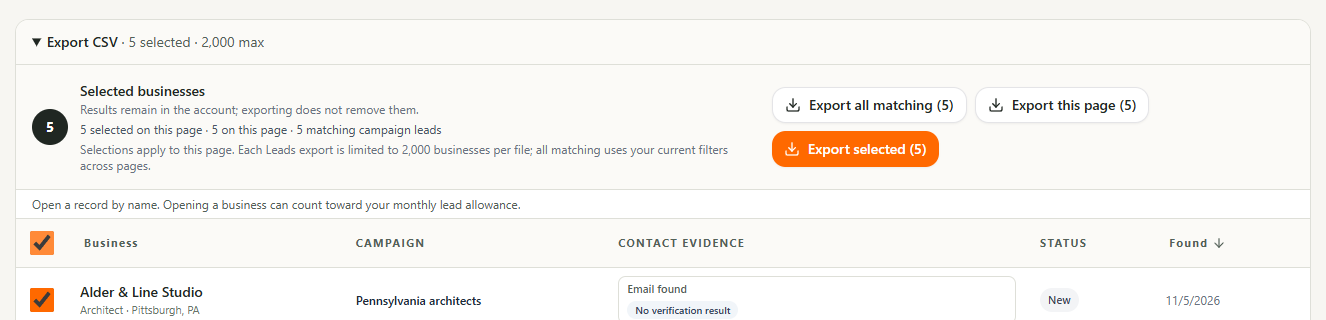
Select rows on the current page, then choose the selected export · Select the image for full size
A café brand is not a route stop
A café’s website lists a roastery with no counter and two cafés with pastry cases. For a tasting run, take the two cafés. Keep the roastery as a possible central contact, not a third delivery stop. You haven’t established who buys pastries yet.
Columns for your own working copy: Cafe · Storefront address · Neighborhood · Parent brand · Food offering evidence · Sample status.
Download the blank worksheet (CSV) ↓ Column headings only. Your Leads Gatherer export is separate.Quick quality check
Take a moment to make sure the list is useful, not just long.
- One row per intended sample stop.
- The source of each menu observation is recorded.
- The route separates storefront addresses from central purchasing.
CSV scope: Each Leads Gatherer download supports up to 2,000 businesses. If the matching count is larger, narrow the set or export individual pages. Search progress and contact checks finish separately; a missing email is not a failed business discovery.
Common questions
Can I use the same workflow for coffee roasters?
Yes, but change the industry and the evidence you inspect. For packaging supply, look for an actual roasting or packing operation rather than a café reselling beans.
Does the list tell me who will buy?
No. It gives you businesses to investigate, not buying intent, supplier exclusivity or permission to send marketing.
Further reading: Visit Seattle: coffee, tea and sweets