Industry guides · 2 min read
How to build a Chicago dental office list without counting every dentist twice
Turn Chicago dental listings into a practice-level directory for a dental lab, with separate offices, specialties and public contact details.
A lab planning pickup routes needs the practice entrance and front desk. A directory of licensed dentists answers a different question: three dentists can share one practice, while one practice can operate two offices. Start with the unit you want your spreadsheet to count.
Step by step
- 01
Look for offices first
On Campaigns, name the run “Chicago — dental lab pickups”. Type “Dental offices” in Business type / industry. Start with the practice, not a list of practitioners’ names. If orthodontics is a separate product line, give that research its own scope rather than mixing the labels.
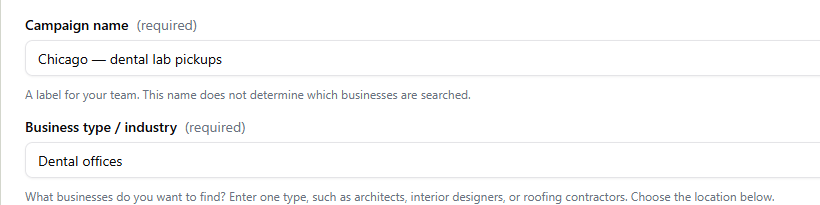
Campaign name labels the list; Business type / industry defines the search · Select the image for full size - 02
Choose the city you can serve
Set Coverage to City or area coverage, select United States, Illinois, then Chicago. If your driver only covers part of the city, note that boundary for review. Compare the planned searches to the intended territory and click Queue … searches once.
- 03
Read a listing as a practice or a person
From the saved campaign click Open campaign leads. Open the practice’s website and look for a locations page, office name and street address. When “Dr. Example” and “Neighborhood Dental” point to the same front desk and suite, link them to one office record in your working sheet. Keep two suites separate until you know they’re the same practice.
On the saved campaign card, click Open campaign leads · Select the image for full size - 04
Check whether the office fits the lab
Compare the site’s services with what your lab makes. A general practice that mentions restorations and an orthodontic-only office may require different product lines. Add a spreadsheet note such as “restorative services listed”, including the page you checked. Do not infer patient volume, purchasing authority or a dentist’s private contact details.
- 05
Export a pickup list, not a provider census
Check the reviewed rows on this page, open Export CSV, and choose the selected-row option. Open the file and add practice group, office/suite, specialty evidence and pickup territory. Use the ADA’s Chicago directory below if you need to cross-check a dentist’s practice affiliation; an individual match is not a second pickup stop.
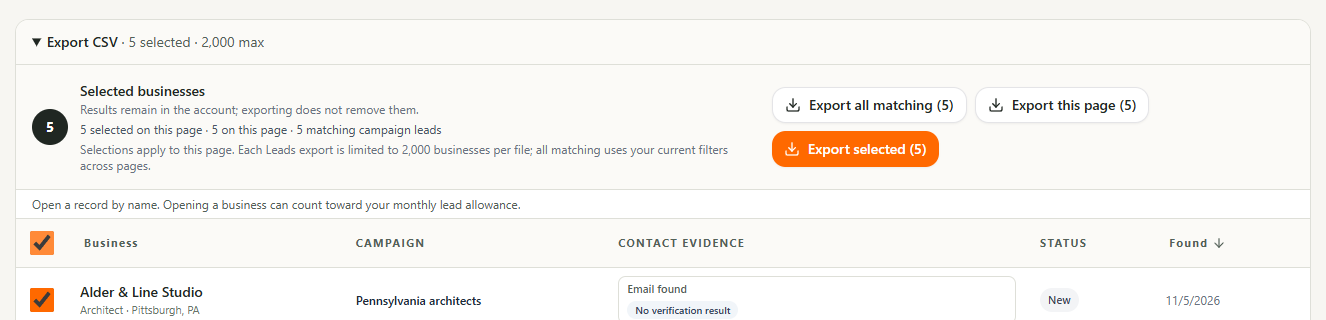
Select rows on the current page, then choose the selected export · Select the image for full size
Two dentists, one stop
Two providers list the same suite and the practice site uses one reception number for both. For the lab driver, keep one practice row. If the same practice also has a second location across town, add that as a second pickup row, not a new parent group.
Columns for your own working copy: Practice · Street and suite · Practice group · Specialty evidence · Public front desk · Pickup territory.
Download the blank worksheet (CSV) ↓ Column headings only. Your Leads Gatherer export is separate.Quick quality check
Take a moment to make sure the list is useful, not just long.
- One row per intended office or suite.
- Public reception contact is distinguished from an individual dentist.
- Separate locations under the same practice are still visible.
CSV scope: Each Leads Gatherer download supports up to 2,000 businesses. If the matching count is larger, narrow the set or export individual pages. Search progress and contact checks finish separately; a missing email is not a failed business discovery.
Common questions
Can I build an orthodontists-only list?
Yes. Use orthodontists as the industry in a focused campaign and check each office’s specialty page before labeling the export.
Do I need an email for every practice?
Not for a pickup directory. A confirmed office address and public switchboard can be more useful than an unverified mailbox.
Further reading: American Dental Association: Find a Dentist in Chicago