Industry guides · 2 min read
How to find HVAC contractors in Dallas for a distributor territory list
Build a Dallas HVAC contractor list, distinguish installers from equipment sellers, and check licensing separately from business discovery.
Suppose your branch sells commercial rooftop-unit parts. A residential repair company can be a real HVAC business and still belong on a different line card. A useful territory sheet records that distinction without discarding the underlying business.
Step by step
- 01
Make the search subject explicit
Open Campaigns, name the run “Dallas — HVAC counter territory”, and enter “HVAC contractors” in Business type / industry. Avoid entering a list of equipment brands: that changes the question from “who installs?” to “who mentions this equipment?”
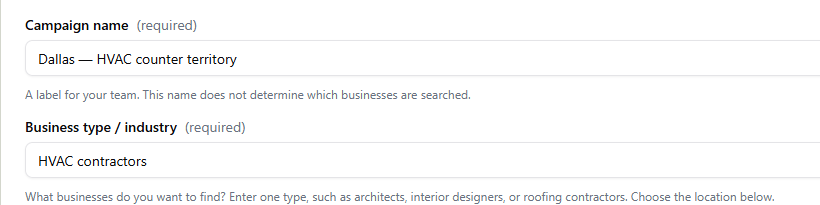
Campaign name labels the list; Business type / industry defines the search · Select the image for full size - 02
Keep Dallas separate from Dallas–Fort Worth
Choose City or area coverage → United States → Texas → Dallas. Preview the planned terms and queue once. If your branch also covers Fort Worth or Plano, use named territories so someone reading next month’s CSV can tell which places you meant to cover.
- 03
Separate contractors from supply counters
Open campaign leads and check business websites. Wording such as installation, maintenance agreements or repair helps identify a contractor. A wholesale catalog plus trade counter hours suggests a distributor. Both can stay in the source list; in your sheet give each its own type. Check the street address against the branch’s own location page.

On the saved campaign card, click Open campaign leads · Select the image for full size - 04
Record evidence for the line card
For commercial work, look for explicit rooftop-unit, refrigeration, controls or commercial service pages. A snowflake logo isn't proof. If a contractor supplies a Texas license number, use the TDLR Air Conditioning and Refrigeration Contractors resource below to check the named license and status separately. No license lookup was performed by exporting the record.
- 05
Hand off a usable territory sheet
Select the reviewed contractors for the first rep, open Export CSV and export the checked rows on this page. Open the file; add service segment, branch territory and evidence URL. A shop serving Dallas from outside the city can be a valid account: mark “serves Dallas” rather than silently replacing its actual address.
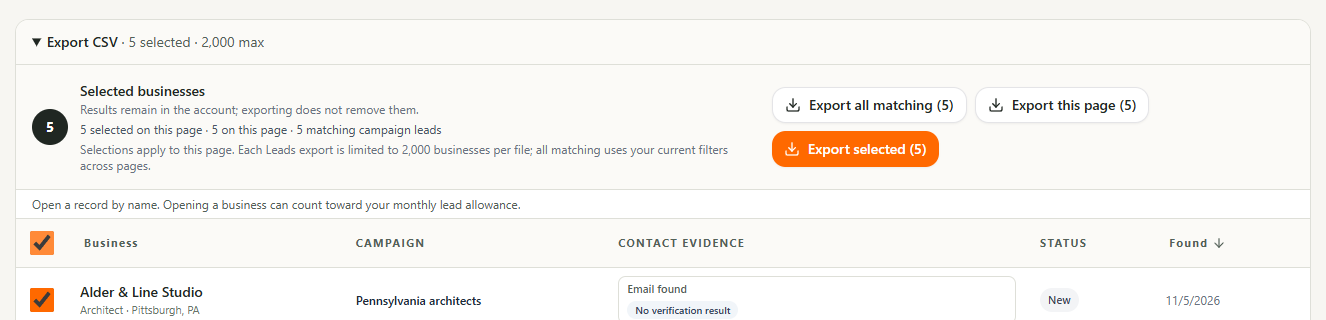
Select rows on the current page, then choose the selected export · Select the image for full size
Territory fit without an office match
A contractor’s office is outside Dallas, but its commercial service page specifically covers Dallas. Keep the physical branch unchanged and put Dallas under service area. That distinction is the difference between a valid sales account and a wasted drive to the wrong office.
Columns for your own working copy: Contractor · Branch · Service area · Commercial service evidence · Public office · License lookup date.
Download the blank worksheet (CSV) ↓ Column headings only. Your Leads Gatherer export is separate.Quick quality check
Take a moment to make sure the list is useful, not just long.
- Contractor, distributor and unknown are distinct.
- Commercial service is supported by a stated offering.
- License status is only filled after a separate lookup.
CSV scope: Each Leads Gatherer download supports up to 2,000 businesses. If the matching count is larger, narrow the set or export individual pages. Search progress and contact checks finish separately; a missing email is not a failed business discovery.
Common questions
What if the company uses a trade name?
Keep both the public name and the legal name when the business supplies them. A name mismatch alone is not enough to declare a license inactive.
How should I split a large result set?
Use campaign or page-scoped exports of up to 2,000 each. Keep the original territory and deduplicate overlapping offices when combining files.
Further reading: Texas Department of Licensing and Regulation: Air Conditioning and Refrigeration Contractors