Industry guides · 2 min read
How to find auto repair shops in Phoenix for a parts delivery route
Build a Phoenix repair-shop directory that separates service bays, collision centers and parts retailers before export.
A commercial brake-parts route is planned around service bays, not the number of map pins. The retail parts counter, body shop and mechanical garage on one block could all appear in a broad automotive search. They have different uses for your stock.
Step by step
- 01
Start with the broad, recognizable business type
Go to Campaigns. Use “Phoenix — mechanical repair route” as the name and “Auto repair shops” as Business type / industry. Don't require a particular vehicle brand in the first pass unless your inventory really is brand-specific.
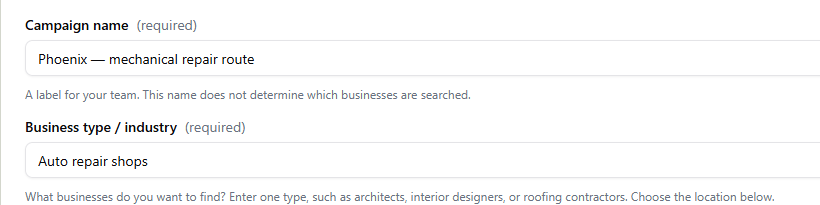
Campaign name labels the list; Business type / industry defines the search · Select the image for full size - 02
Choose the territory and inspect the preview
Set City or area coverage, United States, Arizona, Phoenix. Check the planned searches and click Queue … searches. If your van also runs through Tempe or Mesa, keep those locations identifiable as separate territories, rather than labeling the entire run Phoenix city.
- 03
Identify what happens at each address
Choose Open campaign leads. Check the shop’s own service page for mechanical repair, collision work, tires, mobile service or retail sales. A repair garage and an adjoining parts counter can share a street number. Add a note on the evidence rather than dropping uncertain shops or guessing their bay counts.
On the saved campaign card, click Open campaign leads · Select the image for full size - 04
Match the shop to your stock
For a brake line, look for published brake service; for diagnostic tools, look for explicit diagnostic or electrical services. A repair-network directory such as AAA’s Phoenix locator can corroborate participating facilities. Absence from it does not rule a shop out, and appearing in your campaign does not give it AAA approval.
- 05
Build the actual route file
Expand Export CSV. Use checked rows for a pilot route or all matching if the campaign set is what you need and within the limit. Open the CSV and add delivery zone, shop type, service evidence and a general desk number. Keep dealership service departments separate from independent shops if the buying processes differ.
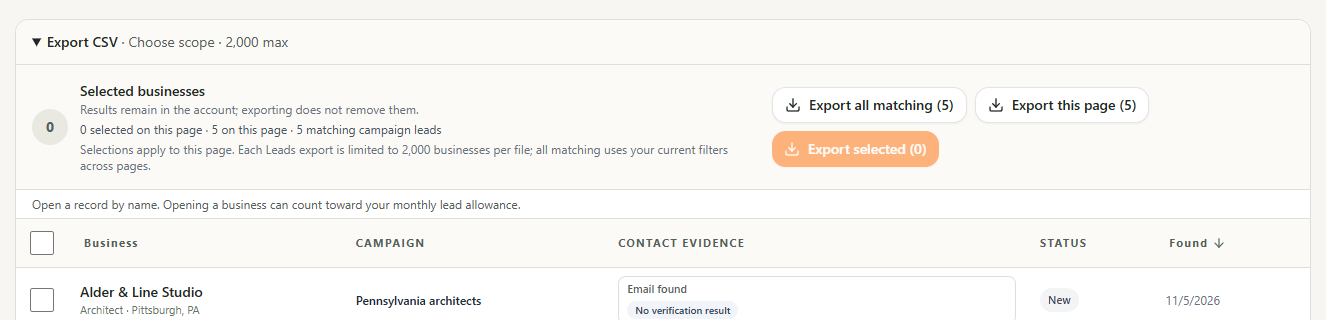
Export CSV: choose all matching, this page or selected rows · Select the image for full size
Two storefronts sharing one central line
A repair chain publishes one number for two shops, but shows two receiving addresses. Use two route rows and mark the phone as central. If the website instead says mobile service only, leave the delivery-stop field unconfirmed.
Columns for your own working copy: Shop · Facility address · Shop type · Services observed · Local or central phone · Delivery zone.
Download the blank worksheet (CSV) ↓ Column headings only. Your Leads Gatherer export is separate.Quick quality check
Take a moment to make sure the list is useful, not just long.
- Every pilot stop has a shop name and a usable street address.
- Retail parts sales are distinguished from service work.
- A chain is linked at brand level without losing individual shops.
CSV scope: Each Leads Gatherer download supports up to 2,000 businesses. If the matching count is larger, narrow the set or export individual pages. Search progress and contact checks finish separately; a missing email is not a failed business discovery.
Common questions
Can I find collision shops instead?
Yes. Change the campaign industry to collision repair or auto body shops, then check the shop’s stated services before assigning the territory.
Should I merge shops that share a call center?
Not for a delivery route. Keep the individual facilities; mark the phone as centralized when the business identifies it that way.
Further reading: AAA: Phoenix approved auto repair facilities