Industry guides · 2 min read
How to build a Denver roofing contractor list for commercial materials sales
Find Denver roofing businesses, distinguish installation crews from storm or referral sites, and export a supplier territory sheet.
If you stock single-ply membrane, a long list of residential shingle installers is not the same as a commercial roofing territory. You don’t need to exclude residential firms from your database. You do need to know which evidence justifies putting a contractor on the commercial rep’s sheet.
Step by step
- 01
Search the trade, then qualify the system
In Campaigns enter “Denver — roofing materials” in Campaign name and “Roofing contractors” in Business type / industry. Start with the trade. Requiring a specific membrane brand at discovery can miss installers that describe the system but not the manufacturer.
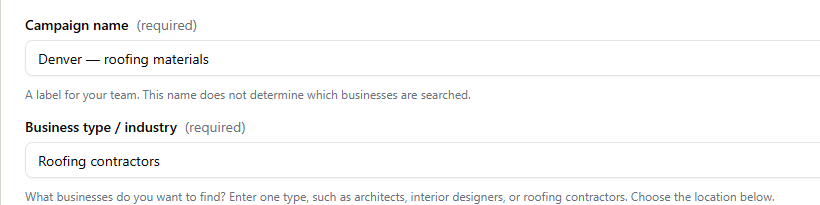
Campaign name labels the list; Business type / industry defines the search · Select the image for full size - 02
Separate an office from a service area
Choose City or area coverage → United States → Colorado → Denver. Review the planned work and queue the searches. Decide whether you want Denver-based offices or any crew serving Denver. Both can be useful, but only the first belongs on a list of offices physically in the city.
- 03
Check for a real contractor and a real offering
Open campaign leads. Visit the business site, check its company name, location, services and projects. Note an explicit reference to flat roofing, TPO, EPDM or commercial reroofing if your line card requires it. A lead-referral form or storm-damage landing page alone doesn't tell you who installs the roof.
On the saved campaign card, click Open campaign leads · Select the image for full size - 04
Keep the licensing check in its own column
If your buying process requires it, follow the City and County of Denver’s contractor licensing resource below and match the name or identifier to the firm. Record the jurisdiction and the date you checked. A Denver-area phone number or project photo is not evidence of a license, insurance or manufacturer certification.
- 05
Deliver a sheet organized by material territory
Select the contractor rows for your rep, open Export CSV and export selected. Open the file and add office versus service area, material system, official evidence page and license-check date if applicable. Leave “unknown” for system type rather than guessing from the company name.
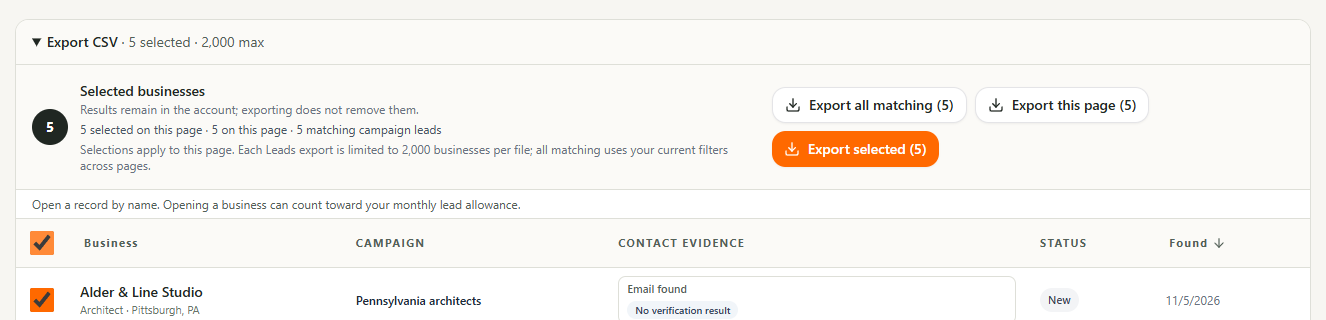
Select rows on the current page, then choose the selected export · Select the image for full size
A project photo versus a service claim
A firm shows a downtown Denver project and describes installing TPO on the project page. That is evidence of a relevant past project. It is not proof of a Denver office or an active license. Keep those three facts in separate columns so your rep can use the first without assuming the other two.
Columns for your own working copy: Contractor · Published office · Denver service evidence · Roofing system · Licensing jurisdiction · Date checked.
Download the blank worksheet (CSV) ↓ Column headings only. Your Leads Gatherer export is separate.Quick quality check
Take a moment to make sure the list is useful, not just long.
- Material system is observed or marked unknown.
- A project in Denver is not mistaken for a Denver office.
- A license check, when required, identifies the jurisdiction.
CSV scope: Each Leads Gatherer download supports up to 2,000 businesses. If the matching count is larger, narrow the set or export individual pages. Search progress and contact checks finish separately; a missing email is not a failed business discovery.
Common questions
Can I focus on residential roofers?
Yes. Check for residential installation or repair and the relevant roof types instead. Keep mixed commercial/residential firms labeled as mixed.
What about multiple landing pages for one company?
Compare the company, official domain and office information. Keep the source pages as evidence, but don't assign one purchasing account per marketing page.
Further reading: City and County of Denver: contractor licensing